Imagine asking one AI coding agent to add a payment feature. It reads the code, writes the backend, builds the screen, writes tests and reviews its own work. By the end, its notes are so long that it forgets what it decided at the start. A human team would never work this way. They would split the job.
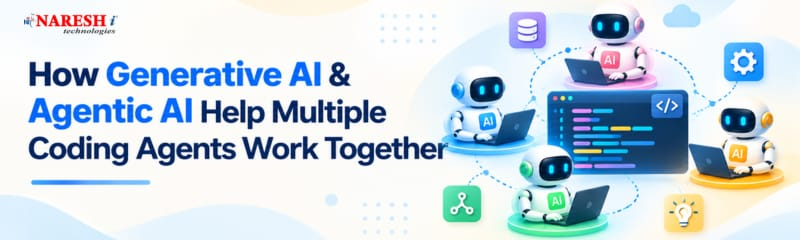
That is the idea behind multi agent AI systems: several agents with clear roles, working on one goal. This guide explains how Generative AI and Agentic AI make that possible, and shows a small Python example. Tools here change quickly, so check current documentation before building.
Table of Contents
Why One Agent Is Not Always Enough
Generative AI (Gen AI) models write and explain code. Agentic AI adds planning, tool use and action. A single agent handles small tasks well, but on bigger jobs it hits three limits: its working memory fills up, it does one thing at a time, and it tends to be generous when checking its own work.
Splitting the job helps with all three. Each agent keeps a smaller, focused context, several can work at once, and a separate reviewer brings fresh eyes.

How Multi-Agent Systems Are Organized
Most setups follow one pattern: one agent plans, others do the work, and another checks the result.
OpenAI’s multi-agent tools are a good example. Its Agents API, announced in September 2026, lets a main agent send independent pieces of work to subagents that run in parallel. Each subagent keeps its own context, and the main agent collects the results.
AI Agent Orchestration: Common Patterns
AI agent orchestration means deciding who works when, who sees what, and how results come together.
|
Pattern |
How it works |
Best for |
|
Handoff |
One agent passes control to another |
Step-by-step flows and routing |
|
Agent as a tool |
A manager calls specialists and stays in charge |
Combining several specialist answers |
|
Parallel subagents |
A lead splits the job and runs workers together |
Independent tasks in separate modules |
OpenAI’s Agents SDK supports handoffs and agents-as-tools, and it records traces so you can see what each agent did.
A Small Python Example
This sketch uses the OpenAI Agents SDK (pip install openai-agents, with an API key in your environment). A manager asks a coder agent to write a function, then a reviewer agent to check it:
python
from agents import Agent, Runner
coder = Agent(

    name="Coder",

    instructions="Write the requested Python function with a short docstring.",

)

reviewer = Agent(

    name="Reviewer",

    instructions="Review the code. List bugs and risky spots. Do not rewrite it.",

)

manager = Agent(

    name="Manager",

    instructions="Use the coder, then the reviewer. Return both results together.",

    tools=[

        coder.as_tool(tool_name="write_code", tool_description="Writes Python code"),

        reviewer.as_tool(tool_name="review_code", tool_description="Reviews code"),

    ],

)
result = Runner.run_sync(manager, "Remove duplicate emails from a list, ignoring case.")
print(result.final_output)
The manager stays in control and calls the others as tools. A handoff would pass control completely to another agent. The SDK may change, so confirm details in its documentation.
Code Review, Problems and Skills
Code review is an easy place to start. AI agents for code review work best as a separate role from the agent that wrote the code. A reviewer can check style, look for missed edge cases, run tests and flag risky changes. Treat this as a first pass, not a replacement for a human who understands the purpose of the change. The same applies to AI-powered code generation in general: let agents draft, and let tests and people decide.
Problems you will meet:
Skills to focus on: Learn Python, API integration, tool usage, Git, automated testing with pytest, and the basics of prompt engineering and AI evaluation.
Choose a Generative AI & Agentic AI course that includes practical tasks, allowing you to develop AI agents, test their outputs, and fix workflow issues. If you prefer self-learning, start with Python and gradually explore Generative AI and Agentic AI frameworks. Rather than judging a course by placement claims, check whether it helps you develop practical skills and build projects that demonstrate your abilities.
Frequently Asked Questions
1. What is a multi-agent AI system?
It is a setup where several AI agents with different roles work on one task, coordinated by code or by a lead agent.
2. How do coding agents avoid breaking each other’s work?
They work on separate branches or sandboxes, while a coordinator merges results and tests check them.
3. Does OpenAI support multi-agent coding?
Yes, its Agents SDK offers handoffs and agents-as-tools, and its Agents API supports parallel subagents.
4. Are multiple agents always better than one?
No, because a single agent is cheaper and simpler for small tasks.
5. What should I learn first?
Start with Python, APIs and tool calling, git and testing, then try an agent framework.

Conclusion
Multiple coding agents work best like a small team: clear roles, focused context, separate workspaces and a firm review step. For your next step, build the manager-coder-reviewer example above and see where it fails on a task of your own.
Would you trust a separate AI reviewer for your most important code review, or keep that step fully human, and why?
Follow NareshIT for more practical insights on technology, skills, and career development.
 +91 8179191999

 +91
8179191999
+91
8179191999