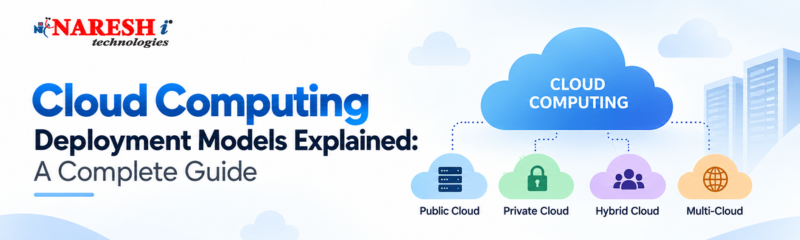
Choosing a cloud environment is not simply a matter of deciding between AWS, Azure, or Google Cloud. Before selecting a provider, organizations need to answer a more fundamental question: Where should their applications, data, and infrastructure live, and who should control them?
That decision is where Cloud Computing Deployment Models become important. A startup launching a new application may prefer the flexibility of a public cloud, while an organization handling highly sensitive information may need stronger control through a private environment. Many businesses also combine approaches rather than choosing just one.
For students, developers, freshers, and professionals moving into cloud careers, understanding these models is one of the fundamentals of cloud computing. It helps you understand not only what cloud services provide, but also how organizations actually structure their cloud environments.
Table of Contents
What Are Cloud Computing Deployment Models?
Why Do Cloud Deployment Models Matter?
Types of Cloud Deployment Models
Public Cloud
Private Cloud
Hybrid Cloud
Community Cloud
Multi-Cloud vs Hybrid Cloud
Deployment Models vs Cloud Service Models
How to Choose the Right Deployment Model
Common Mistakes and Misconceptions
Skills Developers and Students Should Learn
Career Relevance of Cloud Computing
Practical Learning Roadmap
Future of Cloud Deployment
Conclusion
What Are Cloud Computing Deployment Models?
A cloud deployment model describes how cloud infrastructure is organized, owned, managed, and accessed.
In simple terms, it answers questions such as:
Who owns the infrastructure?
Who can access it?
Where is the data stored?
How much control does the organization have?
How easily can resources scale?
Who is responsible for maintaining the environment?
The major cloud deployment models are:
Public Cloud
Private Cloud
Hybrid Cloud
Community Cloud
A multi-cloud strategy is also commonly discussed in modern cloud architecture because organizations may use services from multiple public cloud providers.
Why Do Cloud Deployment Models Matter?
Imagine a company developing an online banking application.
The company needs scalability because thousands or millions of users may access the application. At the same time, it needs strong security, access controls, compliance, and protection for sensitive financial information.
Simply saying “move everything to the cloud” does not solve these requirements.
The organization must determine which workloads belong in which environment. That is the real problem deployment models help solve.
The right model can influence:
Security and privacy
Infrastructure costs
Scalability
Performance
Compliance
Operational complexity
Level of customization
There is no universal model that is best for every organization. The appropriate choice depends on business requirements and technical constraints.
Types of Cloud Deployment Models
Let's understand the major models with practical examples.
1. Public Cloud
In a public cloud, infrastructure is provided and managed by a third-party cloud service provider. Organizations access computing resources through the provider rather than owning the underlying physical infrastructure.
Popular public cloud providers include:
Amazon Web Services (AWS)
Microsoft Azure
Google Cloud
For example, a startup building an e-commerce website might deploy its application on AWS. Instead of purchasing physical servers, the development team can provision computing, databases, storage, networking, and other services as required.
Benefits of Public Cloud
Lower upfront investment: Organizations don't need to purchase and maintain physical infrastructure.
Scalability: Resources can be increased or reduced according to workload requirements.
Managed infrastructure: The cloud provider handles the underlying physical infrastructure.
Wide range of services: Developers can access databases, containers, AI services, networking, monitoring, storage, and more.
Limitations
Public cloud environments can provide strong security, but organizations are still responsible for configuring their applications and cloud resources correctly.
There can also be less control over the underlying physical infrastructure compared with a dedicated private environment.
When should you consider it?
Public cloud is particularly useful for:
Startups
Web applications
Development and testing
Applications with variable traffic
Organizations that want to avoid large infrastructure investments
aws ec2 run-instances \
--image-id ami-xxxxxxxx \
--instance-type t2.micro
2. Private Cloud
A private cloud is designed for the exclusive use of a single organization.
Unlike a public cloud environment where infrastructure is shared across customers, a private cloud gives an organization greater control over its infrastructure and environment.
Consider a large organization handling highly sensitive internal systems. It may require specific security controls, customization, governance, or integration with existing infrastructure.
A private cloud can provide greater control for these requirements.
Benefits of Private Cloud
Greater control: Organizations have more control over infrastructure and configuration.
Customization: The environment can be tailored to specific requirements.
Security and privacy: Dedicated infrastructure can be appropriate for workloads requiring strict control.
Legacy integration: Some existing applications may require infrastructure configurations that are difficult to reproduce in a standardized public environment.
Limitations
The additional control comes with additional responsibility.
Organizations may need to invest in infrastructure, maintenance, security, monitoring, and skilled IT teams. Scaling can also be constrained by available infrastructure.
When is it useful?
Private cloud environments can be relevant for organizations with:
Strict security requirements
Sensitive workloads
Regulatory or compliance requirements
Specialized infrastructure needs
Existing enterprise infrastructure
3. Hybrid Cloud
What if an organization needs the control of a private environment and the scalability of a public cloud?
That's where the hybrid cloud model becomes useful.
A hybrid cloud combines private and public cloud environments, allowing organizations to distribute workloads according to their requirements.
For example, imagine an organization storing sensitive customer information in its private environment while running a customer-facing application using public cloud infrastructure.
During periods of high traffic, additional public cloud resources can potentially be used to handle increased demand.
This approach can provide flexibility, but it also introduces architectural and operational complexity.
Benefits
Flexible workload placement
Combination of control and scalability
Support for gradual cloud migration
Useful for organizations with existing infrastructure
Potentially better utilization of resources
Limitations
More complex architecture
Requires strong networking and security practices
Data movement can introduce latency
Requires teams capable of managing multiple environments
|
Users ↓ Public Cloud Application ↓ Private Cloud Database |
4. Community Cloud
A community cloud is designed for a group of organizations that share similar requirements, such as security, compliance, or operational objectives.
For example, organizations within a particular industry or group may share infrastructure designed around common regulatory or security needs.
The infrastructure can be managed by the participating organizations or by a third-party provider.
Benefits
Shared infrastructure costs
Common security requirements
Easier collaboration between participating organizations
Infrastructure designed around shared objectives
Limitations
Less flexibility than an environment dedicated to one organization
Governance can become complicated
Customization may be limited
Scaling depends on shared infrastructure and requirements
Community cloud is less common in everyday developer discussions than public, private, and hybrid cloud, but it remains an important deployment concept.

Multi-Cloud vs Hybrid Cloud
These two terms are often confused.
Hybrid cloud generally means combining different cloud environments, commonly private infrastructure with public cloud.
Multi-cloud means using services from multiple cloud providers.
For example, an organization might use:
AWS for application hosting
Azure for specific enterprise services
Google Cloud for a particular data or machine-learning workload
That is a multi-cloud approach.
The important distinction is:
Hybrid = combination of different cloud environments.
Multi-cloud = multiple cloud providers.
An organization can even use both approaches at the same time
Deployment Models vs Cloud Service Models
Another common beginner mistake is confusing deployment models with cloud service models.
They answer different questions.
Deployment models ask:
“Where and how is the cloud environment deployed?”
Examples:
Public Cloud
Private Cloud
Hybrid Cloud
Community Cloud
|
S.No |
Service Model |
Full Form |
What the Cloud Provider Delivers |
Common Examples |
|
1 |
IaaS |
Infrastructure as a Service |
Virtual machines, storage, networking, and other infrastructure resources |
AWS EC2, Azure Virtual Machines, Google Compute Engine |
|
2 |
PaaS |
Platform as a Service |
A managed platform for developing, deploying, and running applications |
Azure App Service, Google App Engine, AWS Elastic Beanstalk |
|
3 |
SaaS |
Software as a Service |
Ready-to-use software applications delivered over the internet |
Gmail, Microsoft 365, Salesforce |
Simple PaaS Example
@app.route("/")
def home():return "Hello from the Cloud!"
How to Choose the Right Deployment Model
There is no simple “best cloud model.”
Instead, organizations should evaluate their requirements.
1. Security and Privacy
What type of information will the system handle?
Sensitive information may require stronger isolation and access controls.
2. Cost
Consider both infrastructure investment and ongoing operational costs.
A public cloud can reduce the need for upfront hardware investment, while private environments can require significant infrastructure and management resources.
3. Scalability
Does the application experience unpredictable traffic?
Applications with rapidly changing workloads may benefit from the scalability of public cloud infrastructure.
4. Compliance
Organizations should identify applicable regulatory and data-governance requirements before deciding where workloads and data should reside.
5. Technical Expertise
A sophisticated hybrid or multi-cloud architecture requires teams with knowledge of networking, security, automation, monitoring, and cloud architecture.
Common Mistakes and Misconceptions
“Public cloud means insecure.”
Not necessarily.
Cloud security is a shared responsibility. Providers secure their underlying infrastructure, while customers are responsible for configuring and securing their workloads appropriately.
“Private cloud is always better.”
Private cloud provides greater control, but greater control also means greater responsibility and potentially higher operational complexity.
“Hybrid cloud means using two cloud providers.”
Not necessarily.
Hybrid cloud typically refers to integrating different environments, such as private infrastructure and public cloud.
“Learning AWS is enough to understand cloud.”
Learning a cloud provider is useful, but strong cloud professionals also understand networking, Linux, security, databases, storage, virtualization, containers, APIs, and architecture fundamentals.
What Should Students and Developers Learn?
If you're beginning your cloud journey, don't start by memorizing hundreds of cloud services.
Build your foundation first.
Focus on:
Cloud computing fundamentals
Networking basics
Linux fundamentals
Virtualization
Storage and databases
Identity and access management
Security fundamentals
Containers and Docker
APIs
Monitoring and logging
Infrastructure as Code
Basic DevOps practices
After that, choose one major cloud platform and build practical projects.
For example, developers can learn how to deploy a web application, connect it to a database, configure access permissions, monitor the application, and scale resources.
That practical experience is far more valuable than simply memorizing service names.
Career Relevance of Cloud Computing
Cloud skills are relevant across many technology roles.
Developers increasingly interact with cloud infrastructure even when their primary job is writing application code. DevOps engineers, cloud engineers, system administrators, data engineers, cybersecurity professionals, and solution architects also work extensively with cloud technologies.
For learners exploring cloud computing institutes in Hyderabad, the important question should not only be “Which course should I join?”
Ask:
Will I actually build and deploy something?
A strong learning path should combine concepts with hands-on practice.
For example, someone interested in Azure training in Hyderabad should ideally learn more than Azure service names. They should understand networking, identity, compute, storage, monitoring, security, and deployment through practical exercises.
The same principle applies whether you're learning AWS, Azure, or Google Cloud.
A Practical Learning Roadmap
Here's a simple progression for beginners:
Step 1: Learn the fundamentals of cloud computing.
Step 2: Understand public, private, hybrid, community, and multi-cloud approaches.
Step 3: Learn networking concepts such as IP addresses, DNS, HTTP/HTTPS, load balancing, and firewalls.
Step 4: Choose one cloud platform: AWS, Azure, or Google Cloud.
Step 5: Build a small application and deploy it.
Step 6: Add a managed database and object storage.
Step 7: Configure identity, permissions, monitoring, and logging.
Step 8: Learn Docker and basic CI/CD.
Step 9: Explore Infrastructure as Code tools such as Terraform.
Step 10: Build a portfolio project that demonstrates the complete workflow.
This approach turns theoretical cloud deployment models into practical engineering knowledge.
The Future of Cloud Deployment
Cloud architectures are becoming more diverse. Organizations are not necessarily choosing one environment for every workload.
Instead, architecture decisions are increasingly influenced by application requirements, security, data location, performance, cost, existing infrastructure, and organizational expertise.
This makes understanding deployment models increasingly important for technology professionals.
The future cloud engineer won't simply need to know how to create a virtual machine. They will need to understand where a workload should run, why it should run there, how it should communicate with other systems, and how it should be secured and monitored.
Conclusion
Cloud Computing Deployment Models provide the foundation for understanding how organizations structure and manage cloud environments.
Public cloud offers flexibility and scalability. Private cloud provides greater control. Hybrid cloud combines different environments, while community cloud addresses shared requirements among organizations. Multi-cloud takes the concept further by using services from multiple cloud providers.
The key lesson is simple: there is no universally perfect deployment model. The right choice depends on the workload, security requirements, cost, scalability, compliance, and technical capabilities of the organization.
For learners, the next step is not to memorize definitions. Pick one cloud platform, strengthen your cloud computing fundamentals, and build something you can actually deploy, monitor, secure, and explain.
Frequently Asked Questions
1. What are Cloud Computing Deployment Models?
Cloud Computing Deployment Models describe how cloud infrastructure is hosted, managed, owned, and accessed. The main models are Public Cloud, Private Cloud, Hybrid Cloud, and Community Cloud.
2. What sets public cloud apart from private cloud?
The main difference is who the cloud environment is designed for and how much control the organization has over it. Public cloud services run on infrastructure offered by well-known cloud providers including AWS, Azure, and Google Cloud, while a private cloud is built specifically for one organization and can offer more control over its environment, security policies, and configurations.
3. Which cloud deployment model is best for beginners?
The public cloud is generally a practical starting point for beginners because platforms such as AWS, Azure, and Google Cloud provide accessible environments for learning cloud services, deployment, storage, networking, and security.
4. What is the difference between cloud deployment models and service models?
Deployment models define how the cloud infrastructure environment is deployed, such as public, private, or hybrid cloud. Service models describe what level of service the provider delivers, such as IaaS, PaaS, and SaaS.
5. Should I learn AWS, Azure, or Google Cloud first?
You don’t need to learn all three at once. Start with the fundamentals of cloud computing, then choose one platform and develop hands-on skills through projects. Once you understand one platform well, learning another becomes easier.

Follow NareshIT for more practical insights on technology, skills, and career development.
 +91 8179191999

 +91
8179191999
+91
8179191999




.jpg)
_at_Naresh_IT.png)







.png)